

Celarin LaunchBook

When the moment comes,
don't go looking for the plan.
Start the run.

Go-lives and cutovers. Product launches. Upgrades, close cycles and continuity drills — and the projects that lead up to them. Instead of a spreadsheet and a bridge call, LaunchBook turns each one into a coordinated plan you can rehearse, run live and prove — with one live source of truth for everyone.

Request a demo
  • Replace the 500-row spreadsheet
  • One live board for the whole mission
  • Rehearsals you can measure
  • An audit trail that writes itself

50+ years of mission-critical enterprise experience. Built by engineering leaders who ran large-scale systems at a Fortune 100 technology company — through more coordinated releases, product launches and month- and year-end closes than we can count.

Rehearse it.Run it.Prove it.
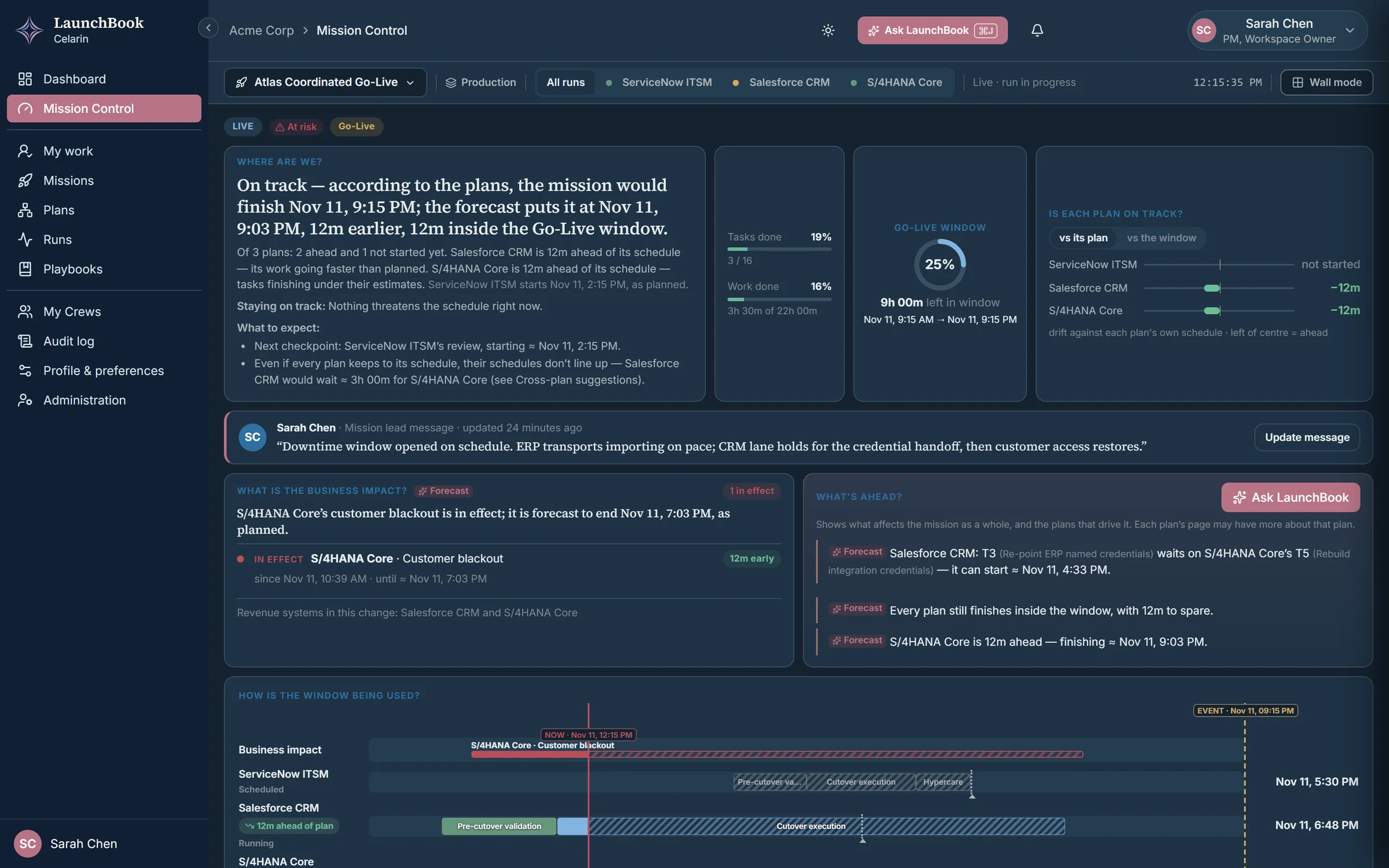
LaunchBook Mission Control during a live coordinated go-live: a one-sentence answer to 'where are we?', the go-live window countdown, each plan's drift against its schedule, the business impact and the mission lead's message
The status quo

The tool you're replacing is a spreadsheet.

Five hundred rows, colour-coded by hand at 3am. Row order pretending to be a dependency. One person who knows what happens next, and a bridge call full of people asking them. It works right up until the moment it doesn't — and that moment is always expensive.

01

The plan drifts

Copies fork, owners change, the dependency logic lives in someone's head — and the real plan is never quite the file everyone opened.

02

“Where are we?”

Status travels three layers down and comes back stale. Executives ask, leads chase, and task owners answer pings instead of doing the work.

03

The evidence is archaeology

After go-live, someone rebuilds what happened from chats, emails and an edited spreadsheet — right when the audit asks for it.

The tour

See it in under two minutes.

Read the transcript

Every company has a handful of nights a year where everything has to go right.

Most still run them from a spreadsheet and a bridge call. So executives fly blind — status is out of date before it reaches them. Leads chase updates instead of leading. Work slips between teams: a missed hand-off, a forgotten task. And nothing is learned for next time.

LaunchBook turns that night into a plan you can rehearse, run and prove. Bring the spreadsheet you already have — it becomes a real plan, with owners and dependencies.

When the window opens, every task goes to the right person the moment it's ready. Mission Control shows the whole mission live — where you are, which plan is slipping, what's affected — so nobody has to ask.

If something fails, the run holds and asks a person what to do. Nothing is skipped quietly.

Leads act straight from the board — notify a team, chase a task, draft the update — instead of building status slides.

Every run is measured against the last. LaunchBook's AI spots the problem areas early and tells you what to change before the next run — all from your own run data.

LaunchBook is AI-native, not an add-on. Its AI knows your plans, your runs and your history, and it's wherever you work — in LaunchBook, in Slack and Teams, and in your own AI. It proposes the change, a person approves, and LaunchBook does it, on the record.

The same board runs a project over weeks. And every step is recorded as it happens.

And it's built for the enterprise, by people with more than fifty years of mission-critical experience — secure by default, open to your own AI, and automated your way.

LaunchBook. Rehearse it. Run it. Prove it.

Mission Control

Every question the war room asks, answered on one screen.

Mission Control is the live board for the whole mission. Each part of it answers one plain question in one plain sentence — so the executive, the lead and the person on the next task all read the same truth, without a status call — and anyone can ask LaunchBook's AI about what they see.

  1. Where are we?On track or not, when it will really finish, and why — in a sentence, not a spreadsheet.
  2. Is each plan on track?Every plan's lane, ahead or behind its own schedule and against the window.
  3. What's the business impact?Which customer-facing systems are in blackout right now, and when that ends.
  4. What's ahead?The next checkpoint, the hand-off between plans, and the early warning before it bites.
  5. How is the window used?Every plan on one timeline, with now, the blackout and the go-live line drawn in.

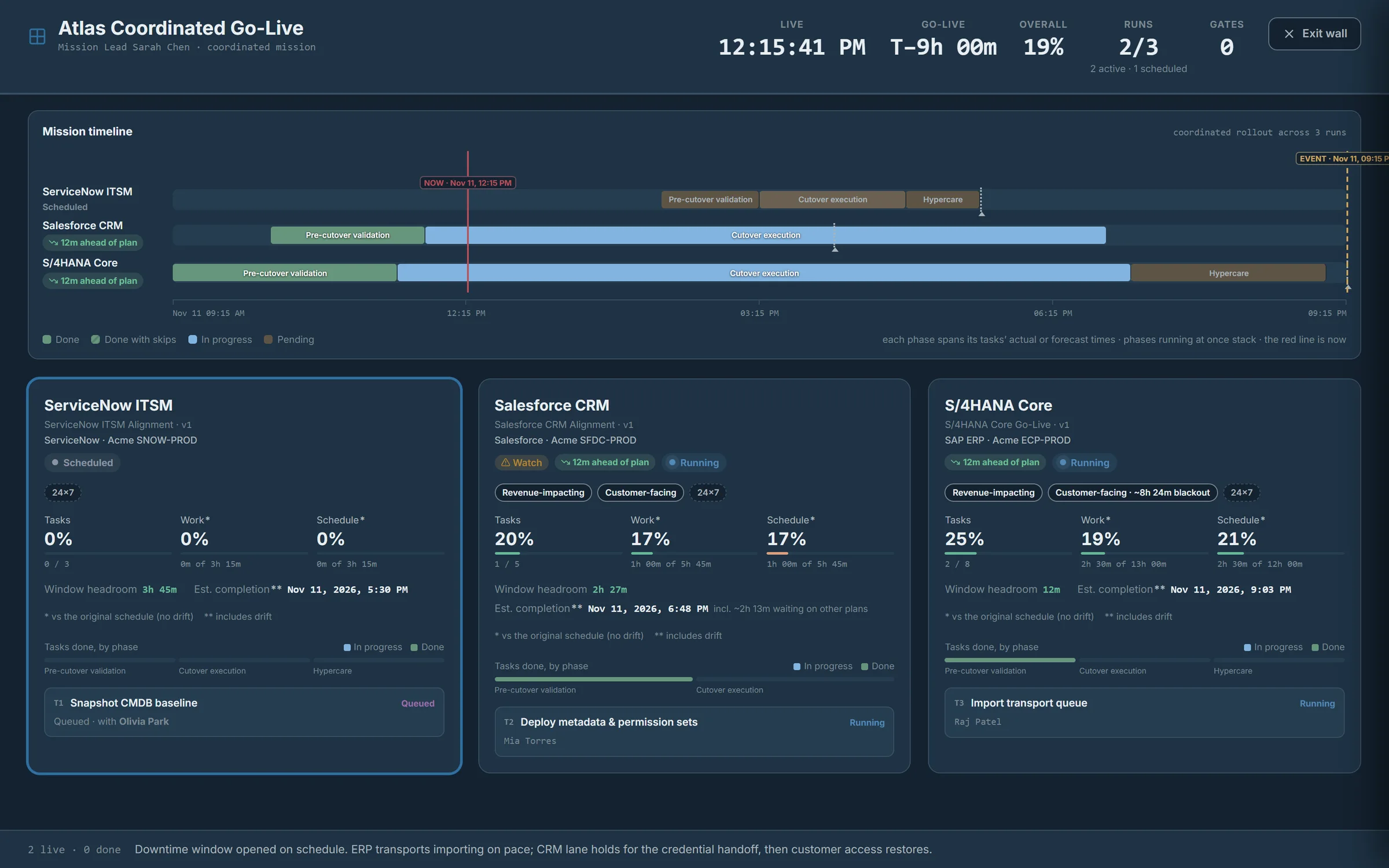
Put it on the war-room wall.

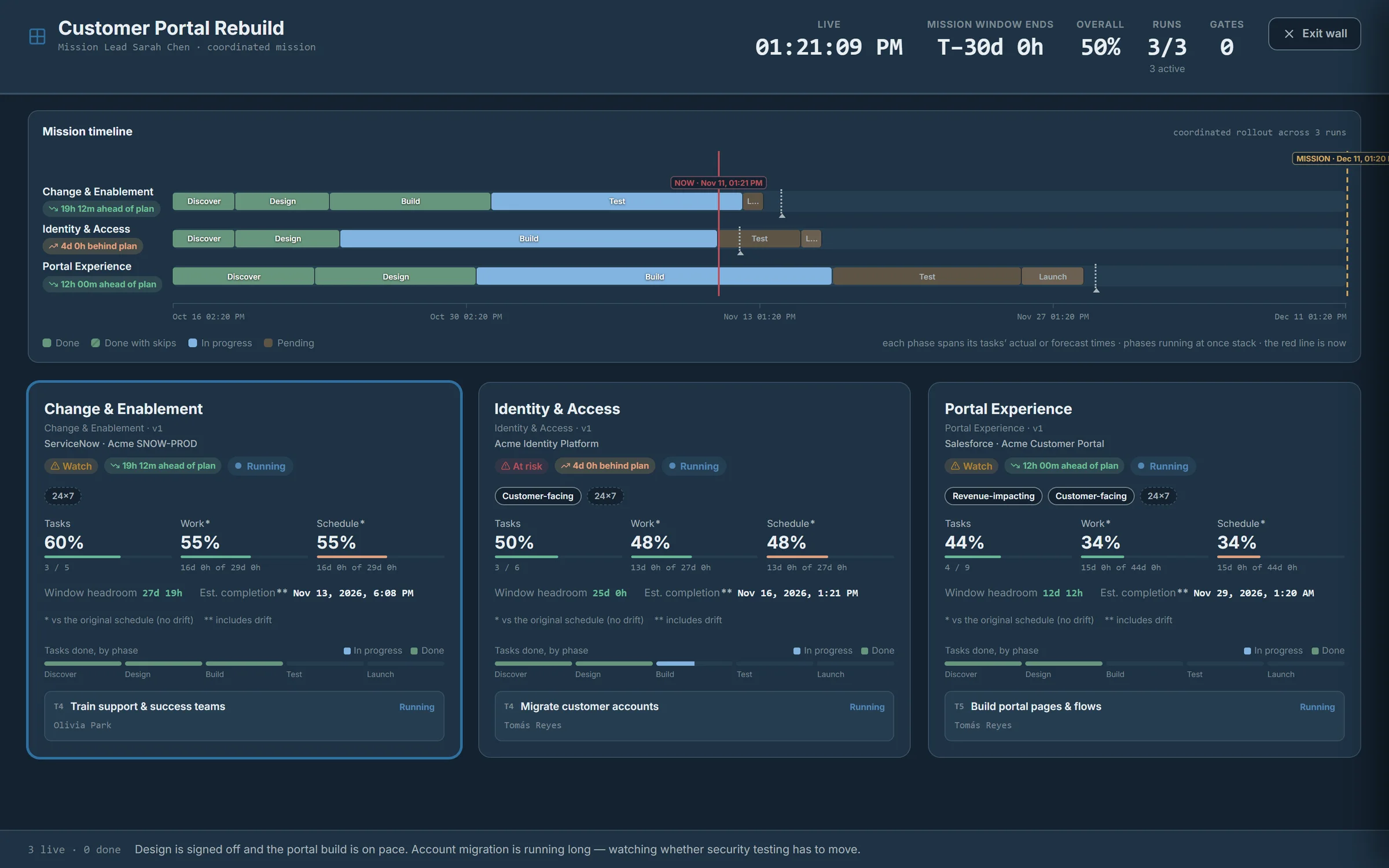
Wall mode is a read-only, full-screen board for the TV in the room: the live clock, the countdown to go-live, a lane for every plan, and a card per plan with what is running now and who has it. The “where are we?” call simply stops happening.

Mission Control in wall mode during a go-live: the live clock, the countdown, overall progress, a timeline lane per plan and a card per plan

Ask about anything on the board

Every attention item and plan card has an Ask button. LaunchBook's AI answers from the live run — why it's late, who has it, whether the window still holds — with the same access you have.

Actions that come with their evidence

Notify the team, chase a task that is running long, or draft the customer update when the blackout end moves — each from the evidence on the board. You see who it reaches, and nothing is sent until you press Send.

History that tells you what to expect

When a plan has run before, Mission Control shows the pattern — and names its source and how confident it is. On a first run it says so, instead of inventing one.

A retrospective that writes the next plan

When every plan has finished, the board turns into the retrospective: what to keep doing, what to stop or fix, and what to change for the next run.

The product

Design it. Rehearse it. Run it. Prove it.

Four things have to happen for anything important to go well — a one-night cutover or a twelve-week project. LaunchBook is one product for all four, and most of the value is in the two everyone skips.

01 Design

A plan is a graph, not a row number.

Real work isn't a list — it's a network of tasks with real dependencies, whether it runs for six hours or six weeks. LaunchBook treats it that way from the first task, so the critical path falls out of the structure instead of living in someone's head.

  • Hours or weeks — run a plan inside a go-live window, or across a project's timeframe with phases like Discover, Design, Build, Test and Launch.
  • Failure is a path, not a surprise — a dependency can fire on success, on failure or on needs-review, so the rollback branch is drawn before you need it.
  • One plan can span many systems — and a task in one plan can wait on a task in another.
  • Downtime is measured, not guessed — mark where customer downtime starts and ends; the figure comes from the run.
  • Honest forecasts — projections respect each owner's time zone, working hours and holidays.
  • Validation steps built in — engineering, functional and business sign-offs as first-class tasks.
  • Draft and review it with AI — ask for a plan or for tasks with their dependencies, or ask “am I missing anything?” and it checks your plan against your past plans and matching playbooks. You approve what it adds.
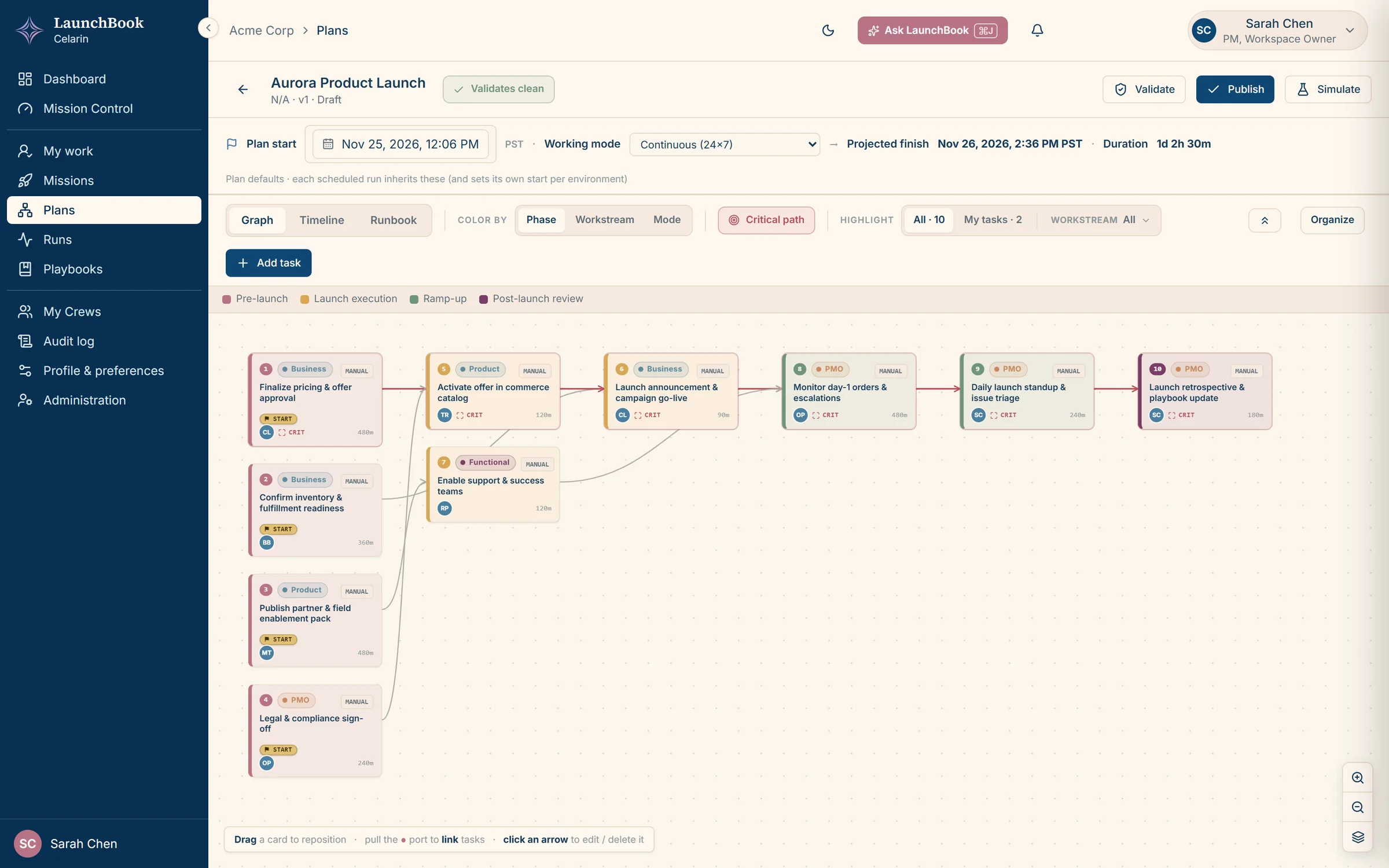
Designing a product launch plan as a dependency graph, coloured by phase, with workstreams, owners, durations and the critical path

A product launch · no target system at all

02 Rehearse

Rehearse until go‑live is boring.

The production run should be the least eventful one. Run the same plan up the environment ladder and watch the risk drain out of it — then let LaunchBook tell you whether rehearsing actually helped.

  • The rehearsal ladder — development, test, staging, production: every plan shows how far it has climbed toward go-live.
  • Every run scored — drift against plan, interventions, and whether it fit the window.
  • Repeat work gets better too — run a month-end close or a quarterly release from the same plan, and each run is measured against the last.
  • “Did rehearsing de-risk it?” — answered with numbers across your run history, not vibes.
  • Simulation runs — walk the whole plan before you have connected anything real.
  • AI that learns from every run — it compares your rehearsals, finds the tasks that keep going wrong, and says what to change before the next one.

Everyone rehearses. Almost nobody learns from it. This is the part no one else does.

The same plan, four times Duration · drift · interventions
Development6h 12m
Test5h 30m
Staging5h 04m
Productionlive

2 rehearsals caught 1 issue before production — and the plan got 68 minutes shorter on the way. LaunchBook can tell you which tasks gave the time back, because it measured every run of the same plan.

03 Run

One board. Everyone looking at it.

When the run starts — for one night or across several weeks — the graph you designed becomes the live run. Each task goes to the right person the moment its dependencies clear, and Mission Control goes on the wall.

  • Nothing auto-fails. Nothing auto-skips. A failure holds its branch and asks a human a clear question.
  • Pre-flight checks — a run that would start into a bad state is held, not started.
  • Overrides are allowed — and recorded. Force a task ahead of the graph, with a justification kept for good.
  • Reach people where they are — notifications by email, Slack and Microsoft Teams.
  • Ask while it runs — in LaunchBook, Slack or Teams: what's blocking, who has it, will we make the window.
  • Dark mode as survival gear — built for the screen a lead keeps open for 48 hours straight.
One plan, running
A plan executing — a failure holds its branch Data loadwaiting Freeze & back upwaiting Import queuewaiting Batch jobswaiting Smoke testwaiting Roll backstandby

The plan is a graph. Watch it run.

04 Prove

The record writes itself.

Every start, outcome, override, retry and approval is written as it happens — not reconstructed on Monday from memory and a chat log. When audit asks what happened at 02:14, the answer is a record, not a recollection.

  • Append-only audit — who, when, and a required written justification on every sensitive action.
  • A scorecard for every run — where the time went, phase by phase, and a report you can download.
  • Exportable evidence — filtered to what the reader is entitled to see.
  • AI on the record too — a change the AI proposed is recorded as such, with the person who approved it.
  • Save the plan as a playbook — so the next run, next month or next year, starts from what worked, not from a blank page.
Task completed01:52 · d.park
Gate approved02:07 · s.chen
Validation failed02:14 · system
Override applied02:16 · justification recorded
Run completed05:31 · 0 exceptions

Written inside the transaction — not after it

Bring your own automation

Automate the steps you already can.

Mark a task automated and LaunchBook runs it — against your own APIs, services, agents and queues. Define the target once per landscape, connect it per environment, and the same plan runs it from rehearsal to production.

  • Test before you trust — every connection is verified up front and health-checked continuously, and a broken one stops a run being scheduled.
  • Never fails silently — a failed call holds the run for a human decision, with the context to make it.
  • Credentials stay isolated — encrypted per credential and decrypted only inside a separate key service that makes the call itself. The plain value never touches the application.
HTTP API

Call a REST or HTTP API

LaunchBook makes the authenticated call — API key, bearer, basic or OAuth 2 — and reads the result.

Message

Send a message, wait for the callback

Hand the work to your queue or webhook; the task waits for your completion callback. No stored secret.

Agent

Hand off to your agent or service

Your agent or service does the step and reports the outcome back to the run.

MCP

Call a tool on your MCP server

First-class Model Context Protocol: LaunchBook invokes a named tool on your own MCP server.

Day one

You don't start from a blank page.

Start from a playbook in the LaunchBook library — a real, complete plan written by people who have run these nights — adapt it to how your company works, and keep it current when the library updates.

SAP S/4HANA

Upgrades, conversions, system refreshes and production cutovers.

Salesforce

Releases, data migrations, integration cutovers and sandbox refreshes.

ServiceNow

Platform upgrades, cutovers and the integrations around them.

Commercial launch

Product, service and market launches — no target system required.

Or bring the spreadsheet you already have.
Import your existing Excel plan and keep the structure your team knows — then gain dependencies, live status and an audit trail on top of it. Most teams start here.
Show me
And turn your own plan into a playbook.
Ran it once? Save the plan as a playbook and run it again — once a year for the fiscal year-end, or every week as a runbook. Every task, owner and dependency comes with it, so nothing is forgotten, and each run is measured against the last.
Where it's used

If it has to go right, it belongs here.

A cutover is the sharpest example, not the only one. LaunchBook runs any event — or project — where a lot of people have to do a lot of things in the right order, against the clock.

Cutover & release management

Cutovers, go-lives, releases, deployments, upgrades, data migrations and production transitions — IT change execution, end to end.

Launch readiness

New products, services, markets and partners — the commercial side of go-live.

Business operations

Month-end and year-end close, billing runs, payroll cycles, inventory counts — the recurring runbooks.

Continuity & recovery

Disaster-recovery drills, failover and failback — prove the runbook before you need it.

Environment operations

Refreshes, clones, provisioning, sandbox set-up and decommissioning.

Project & program execution

Weeks of delivery through discover, design, build, test and launch — and M&A integration and transformation programs.

Governance & compliance

Audit readiness, control validation, access reviews and evidence collection.

Your systems — or none

Model any system you run, or orchestrate work that touches no system at all.

SAP, Salesforce, ServiceNow and your own platforms — a plan can target one system, span several as one coordinated mission, or run with no system at all.

Who's on the board

Three people, three very different nights.

CIO · COO · CEO

The executive

“Are we going to make it — and what will it cost me if we don't?”

Opens Mission Control. Sees where the mission stands, what is in blackout and whether the window holds — without joining a call or asking anyone.

Mission & plan leads

The lead

“I need to make the call, not chase the status.”

Stops being the human message bus. Rehearses until the plan is proven, sees which lane is slipping the moment it slips, and spends the night on the decisions that matter.

Task owners

The doer

“Tell me when it's my turn. Don't make me sit on a bridge call for six hours.”

Gets told the moment their dependencies clear. Sees their task, their notes and their runbook links, records the outcome — and the next person is up.

AI-native

AI built in, not bolted on.

LaunchBook was built from the start for people and AI to run the plan together. Its AI works from your live plans, runs and history — with exactly the access of the person asking — and it meets your team wherever they already are.

LaunchBook AI
Your plansLive runsRehearsal historyYour access only
In LaunchBookOn every screen
✦ Ask LaunchBook

Why is S/4HANA Core behind its schedule?

SlackAsk in the channel

@LaunchBook how's the go-live going?

On track — finishing 12 min inside the window.

Microsoft TeamsApprove from a card

Proposed by LaunchBook AI

Notify the S/4HANA Core team that transports are running late

ApproveDecline
Your own AIClaude or any MCP client

› is the cutover on track?

↳ LaunchBook: get_run_status

  1. 1

    It proposes

    Draft a plan, add tasks with their dependencies, assign people, schedule a rehearsal, notify a team — shown as the exact change, before anything is written.

  2. 2

    A person approves

    In LaunchBook, or from a card in Slack or Teams. Sensitive actions need you to sign in again first.

  3. 3

    LaunchBook does it

    Re-checked against what's true right now, then carried out — and recorded as proposed by AI, approved by you.

What it does
  • Reads the live run and tells you what is actually blocking you, in a sentence
  • Reviews a plan or playbook for what's missing — against your past plans and matching playbooks
  • Compares your rehearsals and says what to change before the next run
  • Drafts plans and tasks, and makes the changes you approve
  • Writes the executive status note for people who don't speak in task numbers
What it never does
  • Change anything without a person's approval
  • Approve a gate, skip a failure or abort a run
  • Guess the downtime number — that is measured from your plan
  • Do anything the person approving it couldn't do themselves

Approved against what was true

A proposal remembers the state it was made against. If things have moved since, approval is refused as stale — so nobody approves yesterday's picture.

Your permissions, not more

The AI goes through the same permission checks as the screen you would use, so it can never do more than the person approving it.

Optional, entirely

Turn AI off and LaunchBook remains fully functional. Calculated numbers are labelled as calculated, forecasts as forecasts — never a guess dressed up as intelligence.

Security

Built for the people who'll ask hard questions.

You're going to hand us the plan for the most sensitive night of your year. Your security team is right to be difficult about that.

50+years

Built by people who know what enterprise-grade means.

Our founders have spent more than fifty years between them engineering and running mission-critical, large-scale enterprise systems — most of it at a Fortune 100 technology company — through more coordinated releases, product launches and month- and year-end closes than we can count. LaunchBook is built to the standard we were held to.

SSO and SCIM

People sign in through your own identity provider with single sign-on, and SCIM adds and removes them as your directory changes. There is no LaunchBook password to leak.

Your workspace, isolated

Every request is scoped to your workspace — enforced in the application and again in the database. If a request can't prove its scope, it doesn't run.

Confidential plans stay confidential

Access by role and by direct assignment, down to the individual plan. A confidential plan is a wall no role bypasses — not even the workspace owner.

An audit trail you can hand over

Sensitive actions are recorded with who, when and a written justification, inside the same transaction — and exported filtered to what the reader may see.

Step-up on the dangerous verbs

Aborting a run, overriding a failed validation or changing roles asks you to sign in again — and always asks why.

Credentials kept apart

Credentials for your automation are encrypted one by one and decrypted only inside a separate key service, which makes the call itself. The application never sees them.

Pricing

Priced by company. Never by seat.

A go-live needs everybody in it — the DBA who owns one task at 4am, the VP who looks once. Charging per seat would make you ration exactly the people the night depends on. So we don't.

One event

Mission

Sized to the scope of the event

One mission, start to finish — plan it, rehearse it, go live, and keep the record. For the team with one big weekend on the calendar.

FocusedStandardComplexStrategic
  • The full product, every playbook, unlimited rehearsals
  • Import your own spreadsheets
  • Your audit trail, exportable when it's done
Contact us to size your mission
Why Celarin

We were the ones on the bridge call.

LaunchBook wasn't dreamed up in a strategy deck — it was born in the war room. I spent years as an engineering executive at a Fortune-100 technology company, running subscription, order-management and quote-to-cash platforms through release after release — the kind where the whole business is watching.

I lived the every-four-hours status call: leaders spending the hour before each call collecting status instead of fixing the problem, reading numbers off a spreadsheet somebody had updated by hand twenty minutes earlier, to executives who had no way of knowing whether they were true. I saw work go missing until hypercare found it, and entire cutovers hanging on one heroic PM — who also needed to sleep.

And it wasn't only IT. I watched business teams re-invent a commercial launch from scratch because last year's plan lived in someone's downloads folder. I watched a year-end close get reconstructed from memory. I watched integrations where the code was the easy part and the hand-off between two teams was the thing that actually went wrong.

Every one of those nights depended on one person who happened to know what came next. That isn't a system. That's a single point of failure with a job title — and when they leave, the knowledge leaves with them.

LaunchBook is the product I kept wishing existed: the plan written down as something you can actually run, rehearsed until it's boring, and proved afterwards — whether the moment is a go-live, a product launch or the year-end close.

“This is the tool I wish I'd had on every go-live weekend.”

— Founder, Celarin
Straight answers

The questions you were going to ask anyway.

What is LaunchBook?

LaunchBook is software for running high-stakes events and projects — go-lives, cutovers, product launches, upgrades, close cycles and continuity drills — from one plan. You design the plan as a graph of tasks, owners and dependencies, rehearse it, run it live from Mission Control while each task goes to the right person the moment it's ready, and keep a complete record of what happened. It replaces the spreadsheet and the bridge call. LaunchBook is made by Celarin.

What is cutover management?

Cutover management is planning and running the switch from an old system or process to a new one — the hours, or the weekend, when data is moved, systems are switched over and teams check the result, usually inside a fixed downtime window. It needs a sequenced plan with owners and dependencies, rehearsals before the real run, live status during it and a record afterwards. LaunchBook is built for exactly that, and for launches, close cycles and projects that work the same way.

Does LaunchBook execute changes inside my systems?

It's your choice, task by task. A task can be done by a person — who is told when it's their turn and records the outcome — or automated with your own automation: LaunchBook can call a REST or HTTP API, hand off to your agent or service, invoke a tool on your MCP server, or send a message to your queue and wait for the callback. Connections are verified before a run can be scheduled and health-checked throughout, and a failed call holds the run for a human decision. If you'd like a ready-made connection for a system, tell us — where there's demand, we'll build it. On that note, if you'd like a playbook (a ready-made plan template) for a process, we can build that too.

Does this replace ServiceNow, or Jira?

No — LaunchBook works alongside them. ServiceNow stays where change is approved; LaunchBook is where it is executed, step by step, with the evidence to show for it. Jira and its peers keep tracking a team's ongoing backlog; LaunchBook runs the work that has a start and a finish and needs many teams to move in the right order — a go-live window, a launch, a close, or a project over weeks — with dependencies across teams, rehearsals, and one live view of which plan is slipping. Your tickets and approvals stay where they are, and LaunchBook gives them the coordinated run they've been missing.

How long until we have a real plan in it?

Days, not months. Copy a playbook from the library and adapt it, or import the spreadsheet you already use. Starting from scratch is still days: LaunchBook's AI can draft tasks and their dependencies for you to approve and review the plan for gaps, and LaunchBook validates the plan before you run it. Then simulate it: you can prove the sequence and the hand-offs hold before you've connected a single system.

What happens when something fails at 3am?

Someone who can fix it hears about it straight away. Every task has a primary owner and a backup, so even when a step is automated and it fails, its owners are notified to review and correct it — while the rest of the plan keeps moving wherever it doesn't depend on that step. Nothing is skipped behind your back: the owner chooses to retry, skip and continue, leave it failed while they work it, or abort, and each choice is recorded with who made it and why. A skip after a failure stays marked as a failure, because the record should be honest even when it's unflattering.

Some of our people will only log in twice a year.

Good — that's the design. A task owner sees a deliberately small surface: the task that's theirs, what they need to do, and a few buttons. There is nothing to learn. The same goes for business leaders and executives who just want to know where things stand: they open Mission Control and get the answer in a sentence — no training, no status call. It's also exactly why we don't charge per seat.

Can we connect our own AI to LaunchBook?

Yes. Like a good friend, LaunchBook's AI meets you where you are — in LaunchBook, in Slack and Teams, or in your own AI, such as Claude, connected to your workspace over MCP once your admin switches it on. Wherever you ask, it sees exactly what you could see — based on who you are and what you are authorized to access, and nothing more. You stay in the loop — you make the decision on every change. Each change is recorded as proposed by the AI and approved by you, by name, so your audit trail always shows both.

How do we get started?

Request a demo and we'll walk your own scenario — your systems, your cutover, your close or your project — through the product with you. Then we plan your first mission together: early customers work directly with the team that builds LaunchBook, from the first plan to go-live.

Early access

Bring your messiest cutover.

Show us the spreadsheet. In thirty minutes we'll show you what it looks like as a plan you can rehearse — a go-live, a launch, a close, a drill or a project — and what your first mission with us would look like.

or write to us at sales@celarin.com

Rehearse it.Run it.Prove it.
Request a demo

Walk your own scenario through LaunchBook.

Thirty minutes with the team that builds it. Pick a time at least a day ahead, so we can prepare for your systems.

Thirty minutes with the team that builds it. Tell us a few times that suit you — at least a day ahead, so we can prepare for your systems — and we'll send an invite.

This opens an email to our team, ready to send.

Prefer email? Write to sales@celarin.com.